From matched grant to filed application.
Seven steps. Five run themselves. Two need you — the interview, where you explain the why, and the final approval before anything is filed.
Five steps run themselves. Two need you.
Match — find what you actually qualify for
Checks your organization against all federal programs, all 50 states, and 140,992 foundations — verified against real external data, not keyword guesses.
Read — structure the funder’s actual requirements
Reads the specific announcement and breaks it into discrete, tagged requirements, so the application is built around what actually gets scored.
Interview — capture the why, in your words
Asks what only you can answer: why this project, what it fixes, and the local detail no database holds. How many questions depends on the grant.
Write — the complete application, with sources
Drafts the full narrative against every scored requirement. Factual claims tie to a citation registry, never to invented statistics.
Grade — score it against the funder’s own rubric
Scores the draft on the published criteria and rewrites what falls short — while there is still time to change it.
Assemble — forms, budget, assurances, and a QA pass
SF-424 family completed and cross-validated so form totals match the budget narrative, then a reviewer-style pass over the whole package.
Approve it — then we file it.
You review the finished package, confirm your information, and authorize submission. Nothing is ever filed without your approval. NexGrant then submits end-to-end to Grants.gov, and the confirmation and tracking number land back on your award automatically.
This is what the software actually looks like.
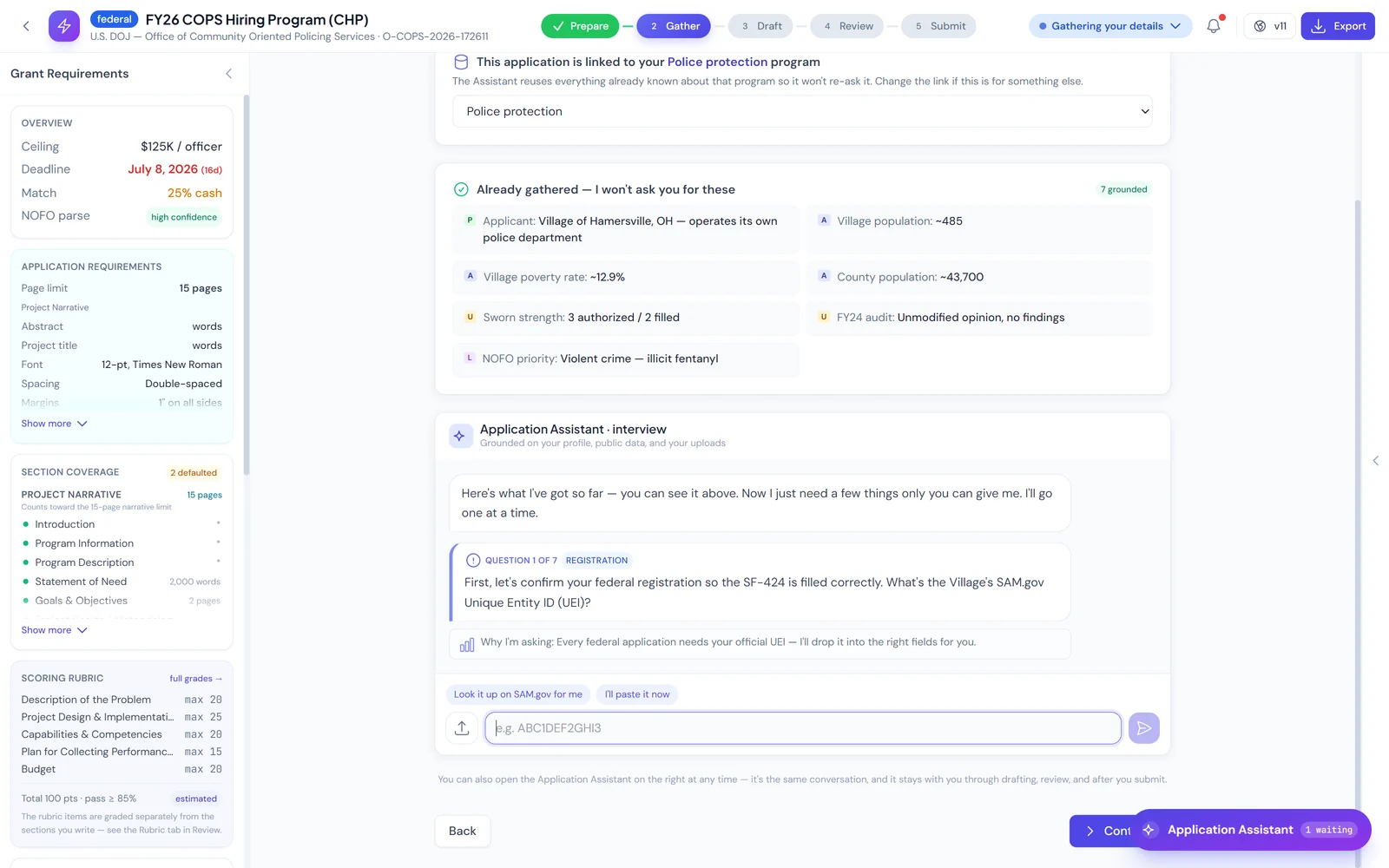
It interviews you the way a grant writer would.
A good grant writer starts by asking why this project, why now, and what happens in your community if it is not funded. So does NexGrant. It already holds your EIN, UEI, budget, prior awards, and service area, and it never re-asks for them. What it asks for is the part no database holds: the reason the project exists, the pain it fixes, and the specifics only someone close to the work would know. How many questions it asks depends entirely on the grant — sometimes two, sometimes fifteen.
- The number of questions follows the grant, not a fixed script
- Everything already on file is shown up front, never re-asked
- Your reasons, in your words, written into the narrative
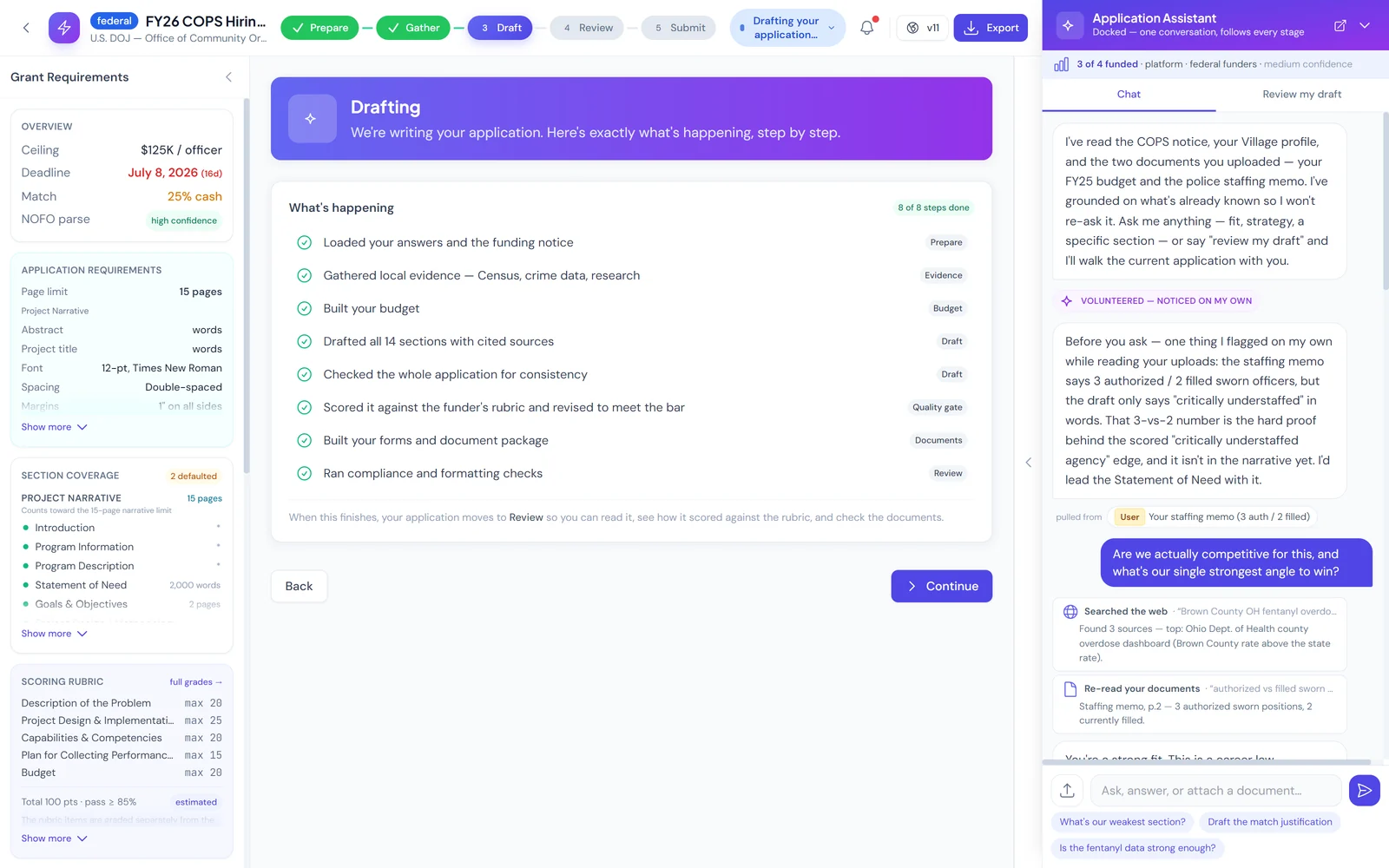
You can watch it work, and interrupt it.
The Application Assistant is a chat panel that sits beside the draft. It shows every step it runs, every source it searches, and every document it re-reads. Ask it to change the framing of a section and it rewrites that section — you never leave the page.
- Eight drafting steps, each one visible as it completes
- Shows its searches and re-reads instead of hiding them
- Ask for a change in plain language; it edits in place
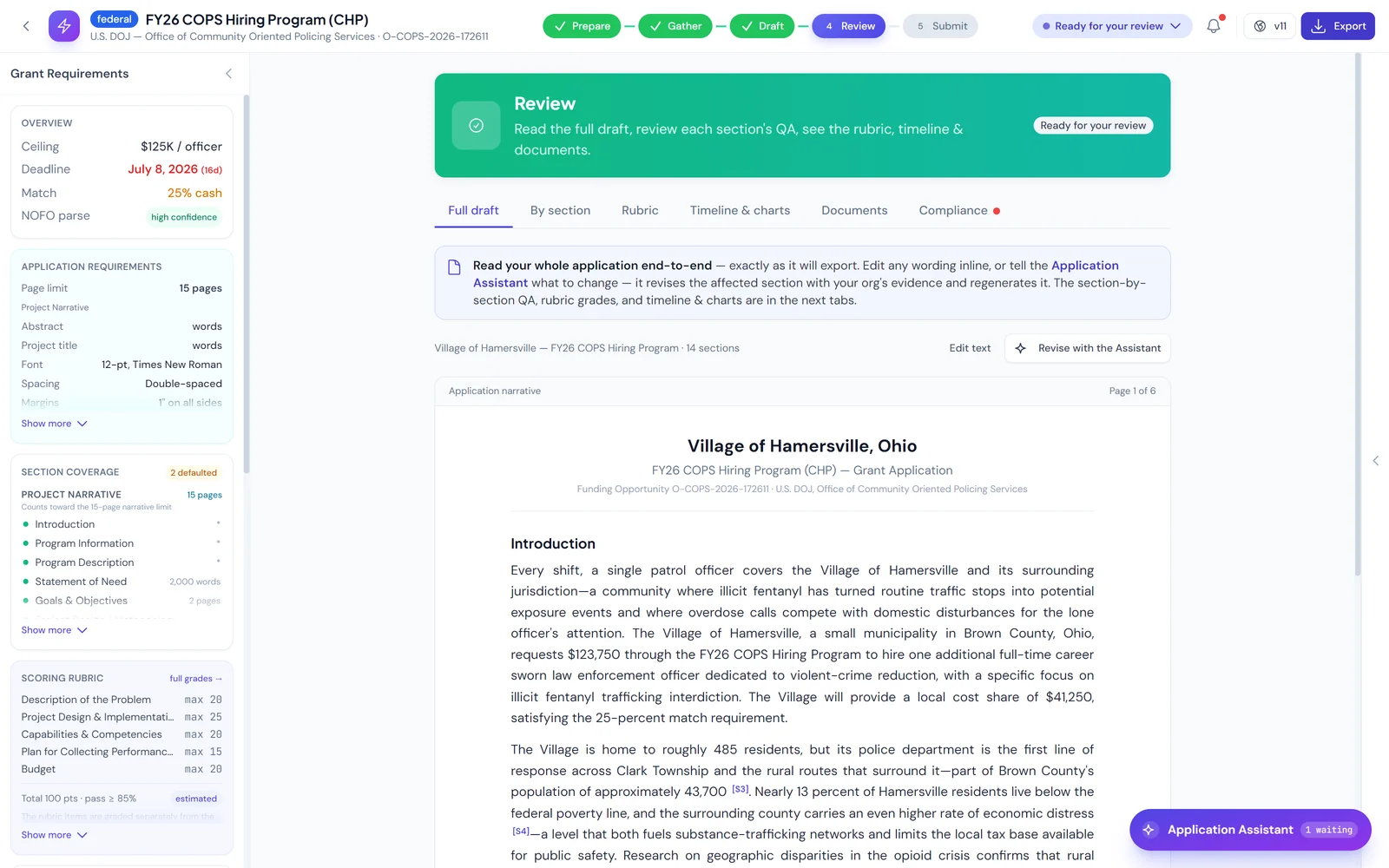
A finished narrative, with every claim sourced.
This is the actual output — not an outline and not a template with blanks. Every factual claim carries an inline citation back to a registry entry, so a reviewer can trace any number to where it came from. Nothing is invented to fill a gap.
- Full narrative, written to the announcement’s scored criteria
- Inline citation markers tied to a source registry
- Word and page limits enforced per section
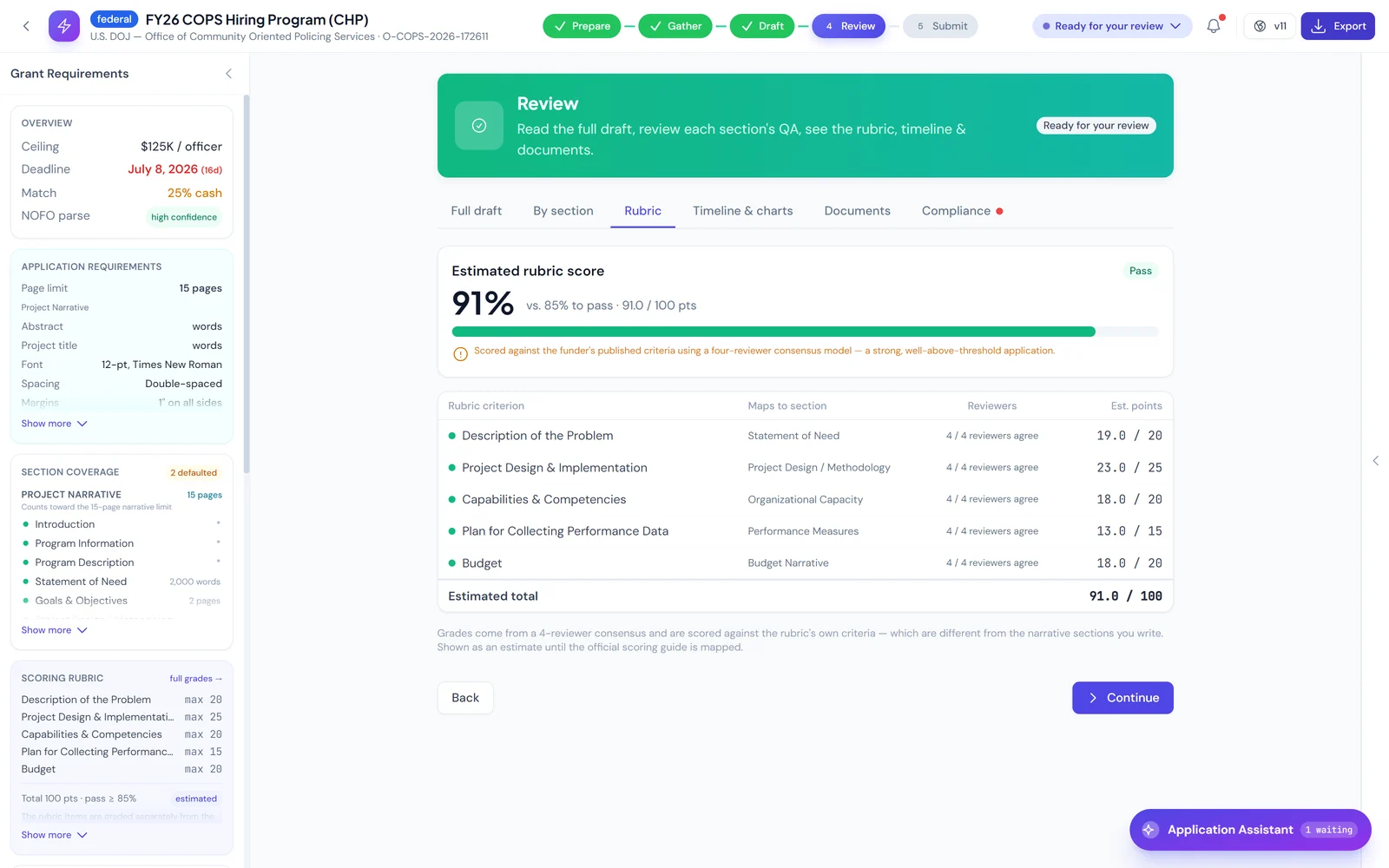
Scored against the funder’s rubric before you submit.
The application is graded against the announcement’s own published evaluation criteria by a four-reviewer consensus pass. You see the score per criterion, which sections are weak, and what to fix — while there is still time to fix it.
- Per-criterion scoring against the published rubric
- Four independent reviewer passes, then a consensus
- Weak sections flagged with the specific fix
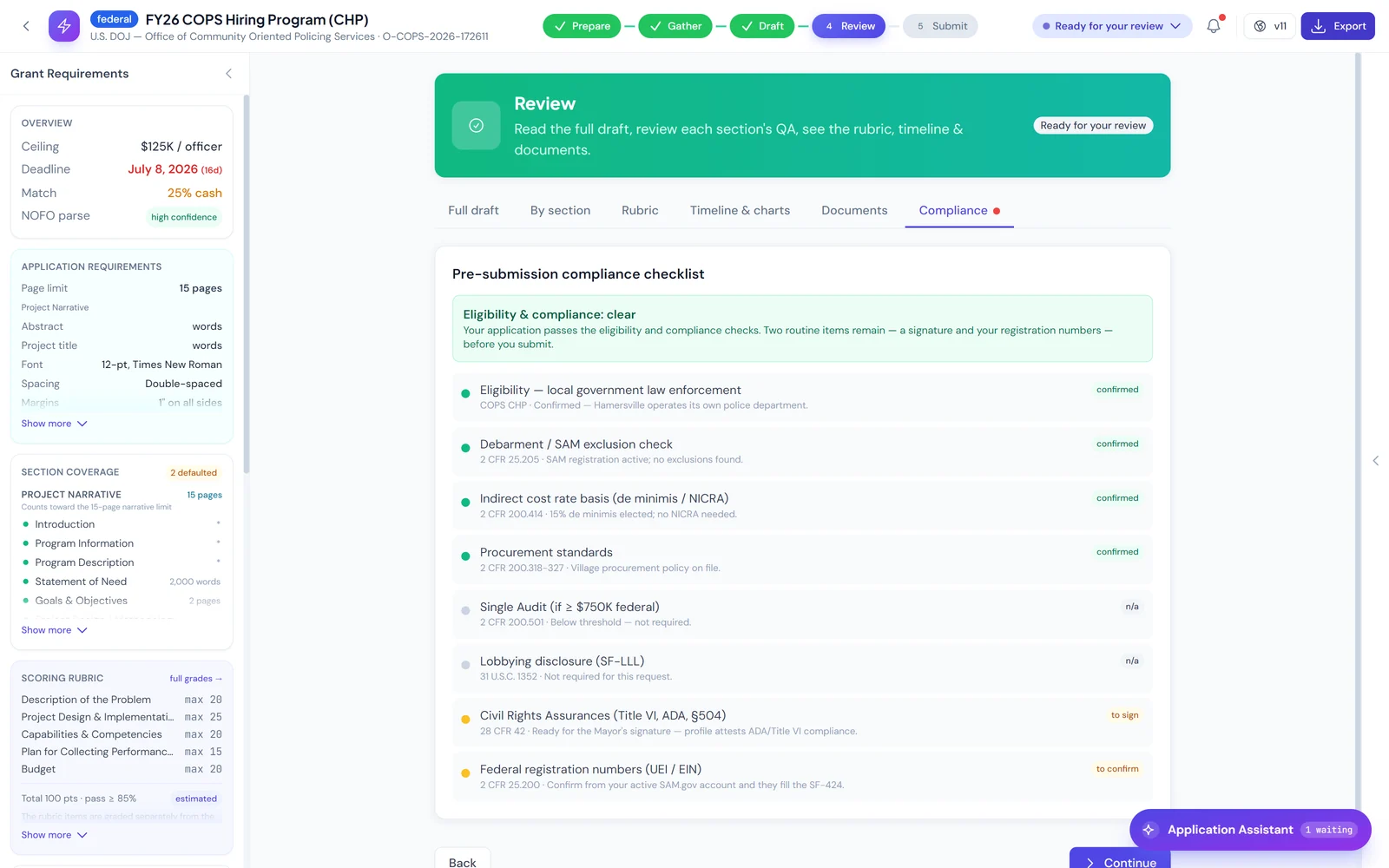
The checks that disqualify applications, run before you file.
Eligibility, SAM exclusion status, Single Audit threshold, SF-LLL lobbying disclosure, assurances, and the 2 CFR provisions that apply to your award — each one checked and cited before the package is considered ready.
- Checked against 2 CFR Part 200, with the citation shown
- SAM exclusion and Single Audit threshold verified
- Assurances and SF-LLL resolved, not left to you
Select any screen above to open it full size. * About the data in these screens
What every other tool makes you do yourself.
Everyone else hands you a draft. Nobody tells you whether it will score.
A draft you can’t evaluate is a draft you have to guess about. NexGrant grades your application against the agency’s published evaluation criteria the way the review panel will — per criterion, with a predicted score range, before it is filed. Most reviewers reject on three or four things. We tell you which three or four while you can still change them.
- Section-by-section feedback with the specific fix
- Predicted reviewer score range with a confidence interval
- Red-flag detection on compliance, NICRA, and budget
Everyone else makes you search three places and hope.
The standard workflow is Grants.gov for federal, Candid for foundations, and a separate scraper or a bookmark folder for every state you care about. Three tools, three logins, three chances to miss a deadline. NexGrant indexes all three in one place, so you search once and nothing falls through.
- Grants.gov plus agency-specific federal feeds
- All 50 state portals indexed and refreshed
- Foundation and private funder coverage
Everyone else stops at a document you have to re-key.
Finishing the writing is not finishing the application. Most tools hand you a Word file and leave you to re-enter it into a federal workspace by hand — which is exactly where formatting breaks and deadlines get missed. Once your package clears grading, one click files it through our authenticated Grants.gov integration: forms, attachments, and all. The confirmation and tracking number come back automatically.
Found a grant we don’t track yet? Upload it and we’ll write it.
We carry the largest unified library of federal, state, and foundation grants in the industry — but no database catches everything, and the grant you need is sometimes the one nobody indexed. So we built the escape hatch: drop in any NOFO or RFP and the AI grant writer drafts the full application against its requirements. There is no grant you cannot pursue through NexGrant.
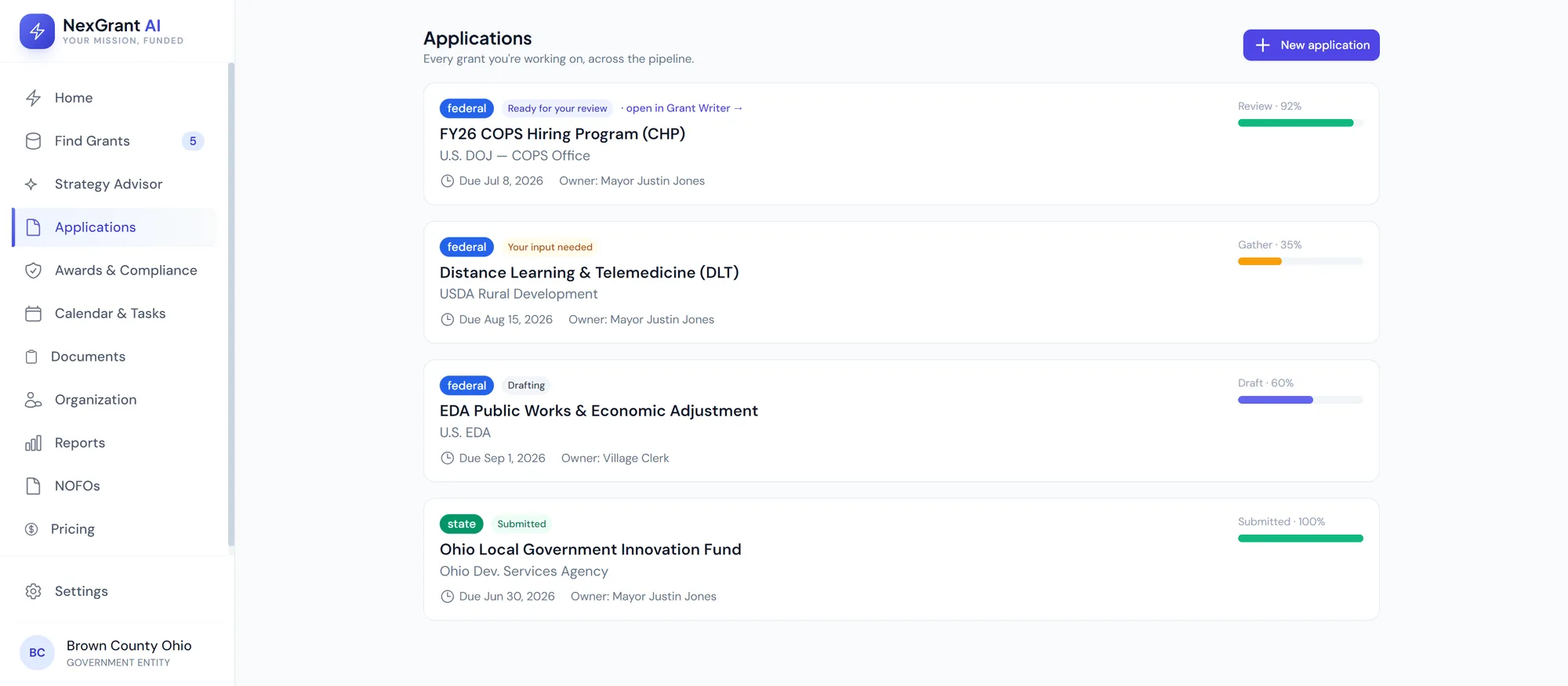
One pipeline. Every grant type.
Federal, state, and foundation applications tracked side by side, with deadlines, progress, and ownership in a single view.
See what you qualify for.
Start a free trial to see the grants your organization matches with — plus a sample application that shows exactly how NexGrant writes. No cost to look.